StyleRoom now has a lot of menus: model shots, Outfit Swap, Background Swap, Horizon Set, Style Clip and more. Ever spent a while looking around, wondering "which menu is the one I need?"
Now you can just ask at the top of the home page. 「StyleRoom AI」 finds the right menu for you!
- What「StyleRoom AI」 is a guide that finds the right menu when you write what you want to make.
- WhereAt the very top of the StyleRoom home page, in the 「What fashion content would you like to make?」 box.
- HowWrite in your own words or tap a button below, and it picks up to three matching menus as cards.
- NextTap [Go] to move to that menu and start making right away.
01 · WhatMeet StyleRoom AI at the top of the home page
When you open the StyleRoom home page, you'll see a large box at the top that asks 「What fashion content would you like to make?」 Photos or videos, just write what you want to do and StyleRoom AI finds the right menu.

Not sure what to write? Try one of the buttons under the box. Common tasks like 「Model shots from clothing photos」, 「Edit a photo I already have」, 「Make a video」 and 「Make a lot at once」 are ready as buttons.
02 · HowHow to use StyleRoom AI: just ask like this!
You don't need to know the menu names. Describe your situation in your own words, for example "I only have clothing photos and want product page model shots without a photo shoot."
TIP. Add where you'll use it, like "for a product page" or "for Instagram Reels", and it picks menus that fit that use even better!
StyleRoom AI briefly explains why a menu fits, then picks up to three matching menus and shows them as cards. The one that fits best is marked 「Best match」.
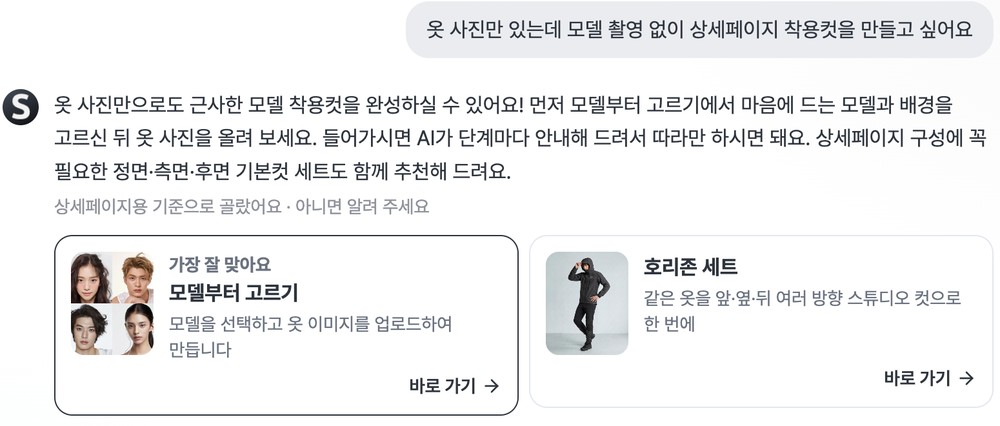
Under the answer, it also tells you how it understood your use, like 「Picked for product pages · let us know if that's not right」. If that's not what you meant, write once more. It continues from your earlier messages and picks again.
Tap [Go] on the card you like to move straight to that menu.
03 · VideoFor videos, it picks templates too
If you write that you want to make a video, you'll see a Style Clip card along with matching video templates in the 「Start right away with these templates」 row. Each template shows its video length.
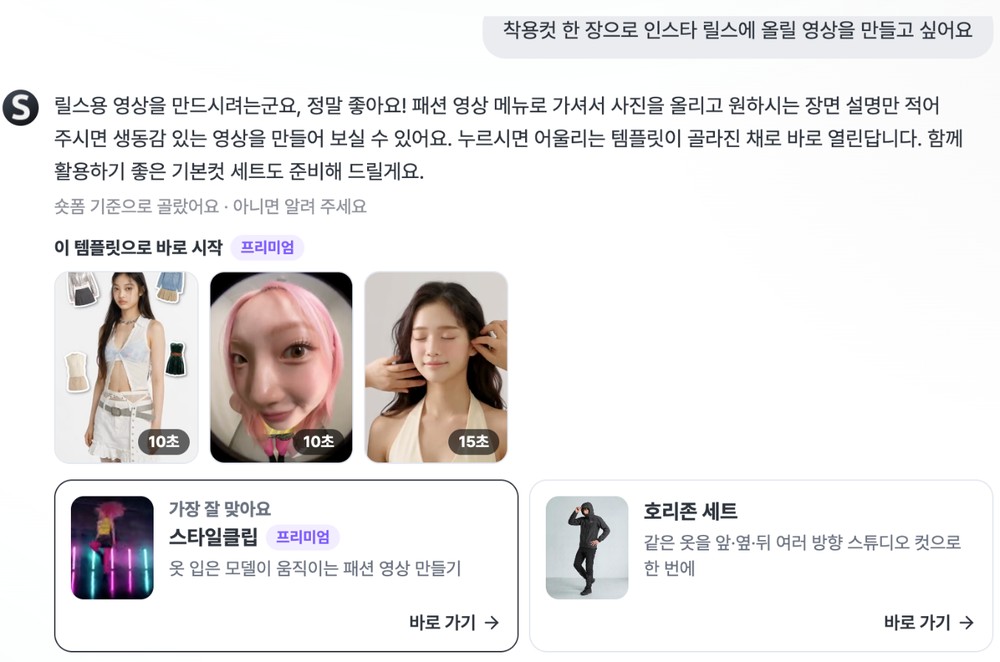
Tap a template and Style Clip opens with that template already selected. Style Clip is a Premium plan menu, so the card and the template row carry a 「Premium」 badge.
04 · FAQStyleRoom AI: frequently asked questions
Does StyleRoom AI make the photos or videos itself?
No. StyleRoom AI is a guide that finds the menu for what you want to do. Tap [Go] to move to that menu, and you make your content inside the menu.
Can I use it without logging in?
You can type your question before logging in. When you send it, a login window opens, and once you log in your question is sent automatically.
How many times a day can I ask?
There is a daily limit on questions. When only a few are left, the screen tells you, and once they run out you can pick a menu yourself from [See all menus].
What if I don't like the suggestions?
Just write what you want once more, as the 「let us know if that's not right」 line under the answer suggests. StyleRoom AI continues from your earlier messages and picks again.
Don't know the menu? Just say it and we'll find it.
Write what you want to make today at the top of the home page.