Training a model means showing it "when this goes in, this should come out" hundreds of times. Put in a photo of a garment, and a photo of someone wearing it should come out. Show that over and over, and the model picks up the rule.
Each single example has three parts.
What goes in
Example
Input image
A photo of the garment laid flat (sometimes several photos)
Target image
One photo of a person wearing that garment
Text
A written description of what the garment is and how it's being worn
The first two are obvious, but why the third one is needed may not be. If you only give the model two images, it has no idea what it's supposed to learn from the pair. The shape of the garment? The background? The pose? It can't tell.
So we spell it out in words alongside.
·
The text attached to one example
wide-leg pants, cropped, beige twill, front pleats, belt loops,
worn by the person, full body, plain background
This text becomes the language you use to talk to that model later. If we taught it that roomy trousers are called wide-leg, we have to call them that later too, or it won't understand. The second piece was all about deciding what those words should be.
We can also plant one word at the very front of the text, a word that isn't used anywhere else. Something like a brand name.
·
Text with one word planted up front
<brand-name> wide-leg pants, cropped, beige twill, front pleats,
worn by the person, full body, plain background
Train it this way, and what it learned only shows up when you include that word. Leave the word out and the model behaves exactly as it did before. In effect, you get a switch.
That's why there's something to decide before training even starts.
How to build it
Result
General: no planted word
The whole model gets tinted that way. Every garment comes out like that
Specialized: planted word
It only switches on when you call that brand. Otherwise it stays as it was
When we train on a brand, it's naturally the second option. If learning one brand means other brands' clothes start coming out with that feel too, it's unusable.
At the same time we decide how many of these words to split into. One word is convenient, but if you pack things with opposite qualities into a single word, you get something in the middle. Teach wide garments and body-hugging garments under the same word, and you get an in-between result that is neither. It's the same shape as the "regular fit" we saw in the previous piece.
And a person doesn't write this text from scratch. We hand the garment photo to an AI, ask it to "describe this garment," get a draft back, and then edit it. Writing hundreds of them by hand, one by one, just isn't possible.
That's the raw material. Gather a few hundred of these three-part bundles (an image pair plus text), and you can run one training job. What follows is how we designed the tool that builds and runs them.
01 · Two Hands
People and agents run it together
A single training run takes a lot of hands-on work. Collect images, group which photos belong together as one outfit, attach text, set conditions, run it, and look at what comes out.
Of all that, we decided only two things truly have to be done by a person.
Who
What
Person
Approve the moment money gets spent · Judge the results
Agent
Build datasets · Design experiments · Run them · Monitor them
Our operating document puts it like this: "Don't turn on a GPU before approval. Don't make the judgment call for us. Everything else is yours."
This isn't a setup where people step out and the machine does everything. The two of us share one training run. The agent prepares the materials and brings a proposal for how to run it, a person decides whether to run it, the agent runs it and watches it, and a person looks at what comes out.
Once the human role shrank to those two things, what the screens needed to show became clear. We no longer needed screens for uploading images, grouping them, and attaching text. What we needed instead was a screen for seeing what's about to run before money is spent, and a screen for laying the outputs side by side.
02 · No Screen For That
We never built a screen for making data
When people build a tool like this, they usually start with an upload screen, a screen for grouping images, and a screen for editing text. We didn't build those.
Adding images, grouping them, attaching text, and assembling sets is all done by the agent through the API. There's no place on screen for making any of it.
It's not that we built less. We chose not to build it, because we decided this isn't work a person should be doing by clicking. If you attach text to hundreds of images one at a time through a screen, the better you make that screen, the longer a person keeps doing that job.
So the screens only cover what a person needs to see: what's running right now, what came out, and switching on and off the GPUs that cost money.
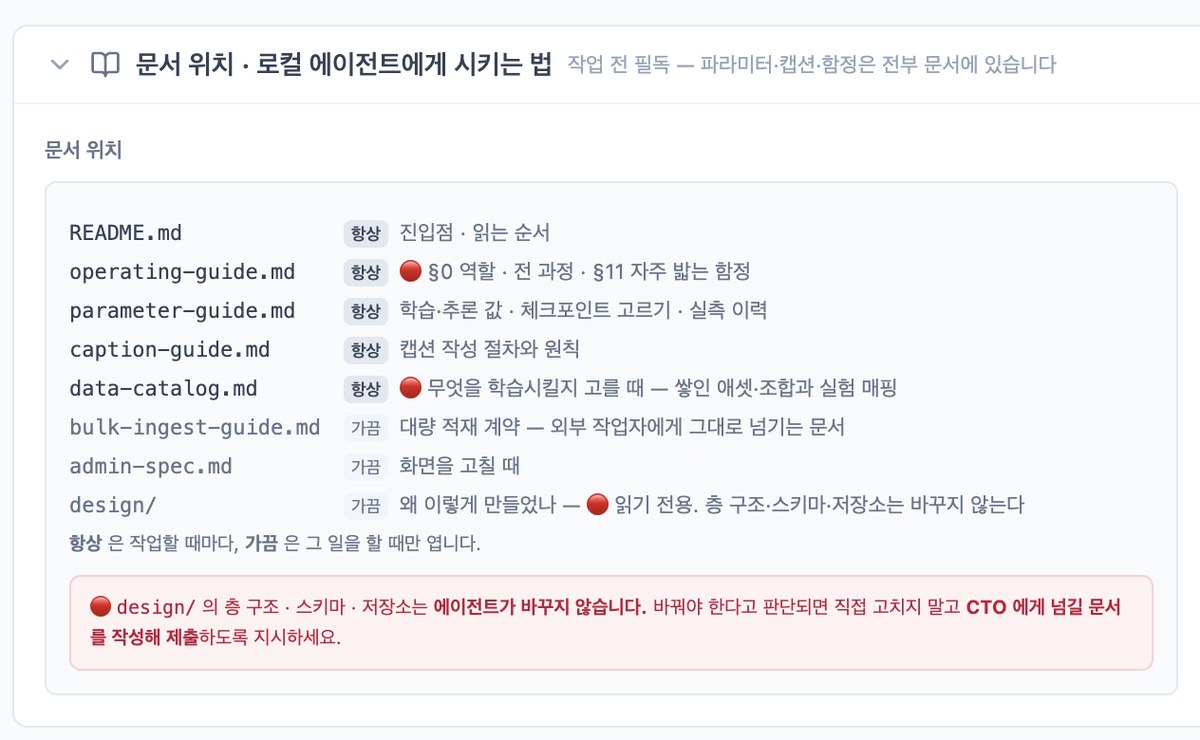
Instead, the screen has something like this attached.
The screen tells the agent what to read and what to do. The panel (in Korean) is titled "Where the docs are · How to direct a local agent." Documents tagged "always" (entry point and reading order, roles and common pitfalls, training and inference values and checkpoint selection, captioning rules, the data catalog) are read on every task; documents tagged "sometimes" (the bulk-ingest contract, the admin spec, the design folder) are opened only for that kind of work. The red box spells out what must not be touched: the agent never changes the layer structure, schema or storage in design/, and if it thinks a change is needed, it writes a document for the CTO instead of editing. This is what sits where a data-making screen would normally be.
Since the agent is the one doing the work, the screen's job changes too. It's not about lining up buttons. It becomes telling the agent what to read and what to leave alone.
03 · Structure Only
No rules for things we don't know yet
The question we wrestled with longest while building the tool was this: what should the tool enforce, and what should be left to decide fresh every time?
Enforce something and you get fewer mistakes, but every experiment outside it gets blocked. Leave it open and you can try anything, but later nothing can be compared. So we cut what we enforce down to three things.
What we enforce
What it means
Structure
One training example is input + target + text. We only keep that shape
Reproducibility
When we save a piece of text, we also save the instruction we gave the AI to produce it
Path
Spinning up GPUs, starting training, and fetching results all go through one fixed channel only
Structure. It's the three-part bundle from the previous section, with one difference. There, both the input and the target were images. But the tool doesn't require them to be images. It only requires that three-part shape.
So the input can be a single garment photo, or two photos (a person and a garment), or not an image at all, but text. That's why text training later slotted right into the same tool.
Reproducibility. In the previous section we said the text starts as an AI draft. That leads to this: six months later you look at that text again, and you can't tell why it looks the way it does. Nothing records what instruction produced that draft.
So we don't save only the finished text. We save what we told the AI when it produced the draft, right next to the text. That way we can trace back later: "so this experiment ran on text that came from this instruction."
There's one more reason this matters. Feed the same image to the AI again and you won't get the same draft. So "no need to save it, we'll just generate it again" doesn't hold here.
Path. Starting training, spinning up GPUs, and fetching results are all called through one fixed channel only. Punch a shortcut when you're in a hurry and it's fast in the moment. But when something breaks, where to look lives only in the head of whoever punched it.
Beyond these three, the tool doesn't care.
What we left open
What changes per experiment
Wording of the text
What to call a fit, what order to write things in, how many items to include
Choosing materials
Which garments to include, tops only or bottoms too
Grouping rule
One image as input or several
Partway through the design, someone suggested the tool should help with the first of these: manage the allowed vocabulary as a list and provide a sentence template. It was tempting. If every text is phrased differently, comparison gets hard later; with a template, everything lines up.
We dropped it. That template would ultimately be "the sentence we currently think is good," and the moment it exists, everything outside it drops out of the experiment. But as we saw in the previous piece, we still don't know what a good sentence is.
The reason is written down like this: "If you build controls before you know what needs controlling, those controls end up constraining the experiments."
All four previous pieces came out of exactly that. We didn't decide in advance which words would work; we only knew after running it and counting. Had we built a sentence template first, we wouldn't even have thought to measure anything outside it.
Leaving things less decided paid off later. There are now two kinds of training running in this tool. One is image training: feed in a brand lookbook and have the model dress things the way that brand does (part 3). The other is text training: feed in text that sellers corrected and have the model write product descriptions that way (part 4).
They learn different things and produce different outputs. But the flow is the same: bundle materials, attach text, build a set, run it under conditions, compare what comes out. Because we hadn't tied the layers to a type of training, we built almost nothing new when text training started.
04 · Why Three Layers
Why we split it into asset · combination · record
At first it was one lump. What goes in, what should come out, and the text attached to it all lived in one document. We split that into three.
Name
What it is
Asset
A single image. On its own it has no purpose
Combination
An input image and a target image bundled as one set, with a name
Record
That combination with text added. The smallest unit that goes into training
The reasons for the split are different at each of the two boundaries.
Why assets and combinations are split: one photo goes into many bundles. The same flat shot goes into "one garment in, a worn shot out" and also into "a person photo and a garment photo in, a worn shot out." Carve the bundle into the image, and that image can only ever be used one way.
So images stay unattached to anything. Back when every new experiment meant registering images all over again, we ended up with multiple copies of the same photo, and deleting one on one side even left the other side pointing at a file that no longer existed.
Why combinations and records are split: they have different lifespans. Grouping photos takes a long time, and once it's done you keep using it. Text changes with every experiment. Tie them together and changing a single line of text means rebuilding the whole bundle, and reusing the bundle drags the old text along with it.
The design rationale is recorded like this: "Combining assets to prepare a dataset is the hard part, so it's good if that can be reused."
Once we split them, an experiment that had been stuck opened up: attaching two versions of text to the same photo bundle and comparing which one trains better. Before, one bundle had only one text, so there was nowhere to put a second, and we overwrote it and ran again. That erases the earlier one, and then there's nothing to compare against.
We also decided to give combinations names at this point. Once there are several input images, you can't tell what's what just from a list.
And on top of that sits the set.
A record is one example that can go into training. Can go in, not will go in this time. A set is what you pick out of the accumulated records and say, "this experiment runs on these."
It needs to be separate because the same record goes into many sets. We build a training set from 120 garments and a validation set from 36 garments that weren't in it. The next experiment splits the same materials a different way. Carve "this time's set" into the record and you can't run the next experiment.
To sum up: an asset is material, a combination is material bundled together, a record is that bundle with words attached, and a set is the ones picked for this time. The first three accumulate; sets are made fresh for each experiment.
A set actually run under specific conditions is a run, and trying the output on other garments is validation.
05 · Tags, Not Folders
We don't sort images into bins by type
When we add an image, we don't put it somewhere like "for fitting-shot training." We just add it and attach tags: whether it's a flat shot or an on-body shot, which product it is, where it came from.
Sorting into bins by type would make things easier to find, but we didn't. That's because we're not training just one thing.
What we want it to learn
What that needs
Styling on the body
How to put the garment on a person
Details
How buttons · stitching · fabric look up close
Background and pose
Where to stand and what pose to strike
Model
Who is wearing it
Here's where the problem shows up. The same photo becomes a different thing depending on the experiment. In an experiment teaching how garments are worn, that photo is the target image; in an experiment teaching backgrounds, the very same photo is background material.
To sort things into bins by type, you'd have to know in advance what training you'll do in the future. Sort without knowing that, and every time a new type comes along you end up adding the materials all over again.
So images don't go into one place; we filter them by conditions. When picking materials, it's not "open this folder" but "on-body shots in this product category," pulled by whatever conditions are needed at the time.
Thanks to that, when we start a new kind of training we don't add images again. We just add more tags to what's already there. An image can carry many tags, and more can be added any time later.
06 · No Purpose Field
We don't stamp a purpose on materials
The same thinking applies one layer up. We don't make separate bundles for training and for validation. A set doesn't even have a place to write its purpose. Whether it's used for training or validation is decided when it runs.
During design we put it like this: "Our records can be used for training or for validation. It depends on how the set is put together."
For a while there was one thing that broke this principle: a feature that stamped "evaluation only" on individual images. It looked handy, but once you pin a purpose on a material, that image can never be used for training. We ripped it out.
When we removed it, we settled one more thing: you can't just take out the value and leave the field. Remove only "evaluation only" and "for training" is left alone, so the purpose field is half alive, and the next person fills it in again. So we removed the field entirely.
This principle makes a certain experiment possible: putting the exact bundle used in training straight into validation. It shows how faithfully the model reproduces what it learned, and that's the ceiling this training can reach. If it falls short of that, it hasn't learned enough; if it only does well there and falls apart on new garments, it has memorized.
07 · Freeze
"We can just run it again" doesn't hold
Earlier we said text comes out different when you generate it again. Bundles have the same problem. Over time, records in a set get their text edited, and sometimes their images deleted. Then exactly what last month's training ran on gets blurry.
So when we start a training run, we copy the set as it is at that moment and keep that copy separately. What actually goes into the GPU is this copy, not the set.
For the same reason, a bundle that has been run is locked against edits. If you want to change it, you make a new one. A few months later someone will inevitably ask "what did we put in back then?" and the evidence at that point is not the bundle but the copy taken at the time.
That's why, for any training run, we can pull up exactly what it ran on and what it was validated on, at any time. Even for a run from six months ago, we can feed in exactly what went in back then.
08 · The Queue
Queue the work, and the GPU picks it up
Training and validation use GPUs. Leave one on and it keeps costing money even when idle, and it doesn't switch off by itself. So we don't turn on a GPU and then give it work; we queue the work and then turn on the GPU.
01Queue the workPut the set and conditions to run on the queue
02A person approvesDecide after seeing how many images, how long, and how much it costs
03Turn on the GPUOnce up, it picks its own job off the queue
04Turn it off when doneDelete it right away, no waiting around
The order can't be reversed. Turn on a GPU against an empty queue and it just spins with nothing to do, while the bill keeps running. So we nailed down the order, queue first and then power on, in the documentation.
Each job can also specify which GPU should take it. When several experiments run at once, if a GPU someone else started grabs your job, the order gets tangled. We made it so a job can't even be submitted without that assignment.
So we keep the queue filled and turn on GPUs only when needed. While one training run is going, the next one can already be queued, and in between, the GPU stays off.
09 · The Last One Is Never Best
The fully trained one has never been the best
Training doesn't finish in one pass; it goes over the same data many times. And along the way it keeps saving what it has learned so far. When a training run ends, it leaves about twenty of those intermediate saves. You'd think the one that went all the way would be the best, but in every training run we've done so far, the last one has never been the best.
97%Midway checkpoint: fabric texture this close to the original
82%Trained all the way: actually dropped
You'd expect more training to mean a closer match, but it goes the other way. It's just as we wrote in the earlier piece: overtrain it and the secondary elements break down first. Shoes converge to a single shape and backgrounds drift to gray. The fit we meant to teach is still fine at that point, but everything around it stiffens first.
So we don't use only the finished one. We pick several intermediate saves, run them all on the same garments, and lay them side by side. Where you pull from changes the result as much as changing the conditions does.
10 · Not Wired In
We didn't plug it straight into the service
This tool sits apart from the StyleRoom service. Even when training finishes and produces an output, it doesn't flow into fitting shots or style shots automatically. Plugging it in takes separate work by a person.
Naturally, this question came up while we were building it: once training is done, shouldn't it be usable in the service right away?
For that, you'd have to decide in advance where and how to plug in the output. Attach it to fitting shots or to style shots? Let sellers pick and switch it on, or have it attach automatically per brand?
But to decide that, you first have to know what you'll be training. Something that learned a brand's styling, something that learned backgrounds, and something that learned how to write product descriptions all attach in completely different places. Build the connection first, while you don't yet know what you'll train, and once again that connection ends up setting the direction of the training.
It's the same story as not building the sentence template earlier. This time it plays out outside the tool rather than inside it. Build one place to plug things in, and from then on you only do training that fits there.
So we flipped the order.
01Run the trainingDecide what it should learn case by case
02Look at the resultsSee whether it's usable, and where
03Build the connection thenOpen one channel that fits that result
We don't treat connections as a feature built ahead of time; we open one each time a training run succeeds. This means connections come later. In exchange, we never build a connection nobody will use and then bend experiments to fit it.
Keeping it separate has one more benefit. In experiments, failure is normal. The conditions were wrong so you queue it again, the result is a mess so you throw it out, you run the same thing twenty times. If this were mixed in with where the service runs, you'd get cautious every time you queued something. Cautious experimenting means far fewer experiments.
11 · What We Take
To sum up
What we decided
Why
People only approve and judge
The rest isn't work to do by clicking
Fix only structure · reproducibility · path
Make rules for what you don't know, and the rules decide the answer
Separate facts from interpretation
Tie together two things with different lifespans, and you end up rebuilding the materials
Don't sort images by type
We don't know what training we'll do next
No purpose stamped on materials
We need to run many experiments on the same materials
Freeze at the moment of running
Rebuild it and you get something different
Not plugged into the service
Build the place to plug in first, and you only do training that fits it
Building the tool taught us one thing: fields added for convenience end up blocking experiments later. Things like "evaluation only," which seem obvious at the time, become walls you can't get past in the next experiment.
So we built this tool to decide less. While we still don't know what good training looks like, it's better for the tool not to decide the answer. Every result in the previous four pieces came from re-queuing and adjusting, many times over, inside it.