What StyleRoom sells to sellers is "a photo of someone wearing this garment." Upload a photo of the clothing, and you get back an on-model shot.
These photos go on product detail pages, so there is one standard they have to meet. The garment in the photo has to match the real thing.
But with certain garments, the same thing kept happening.
01 · The Balloon
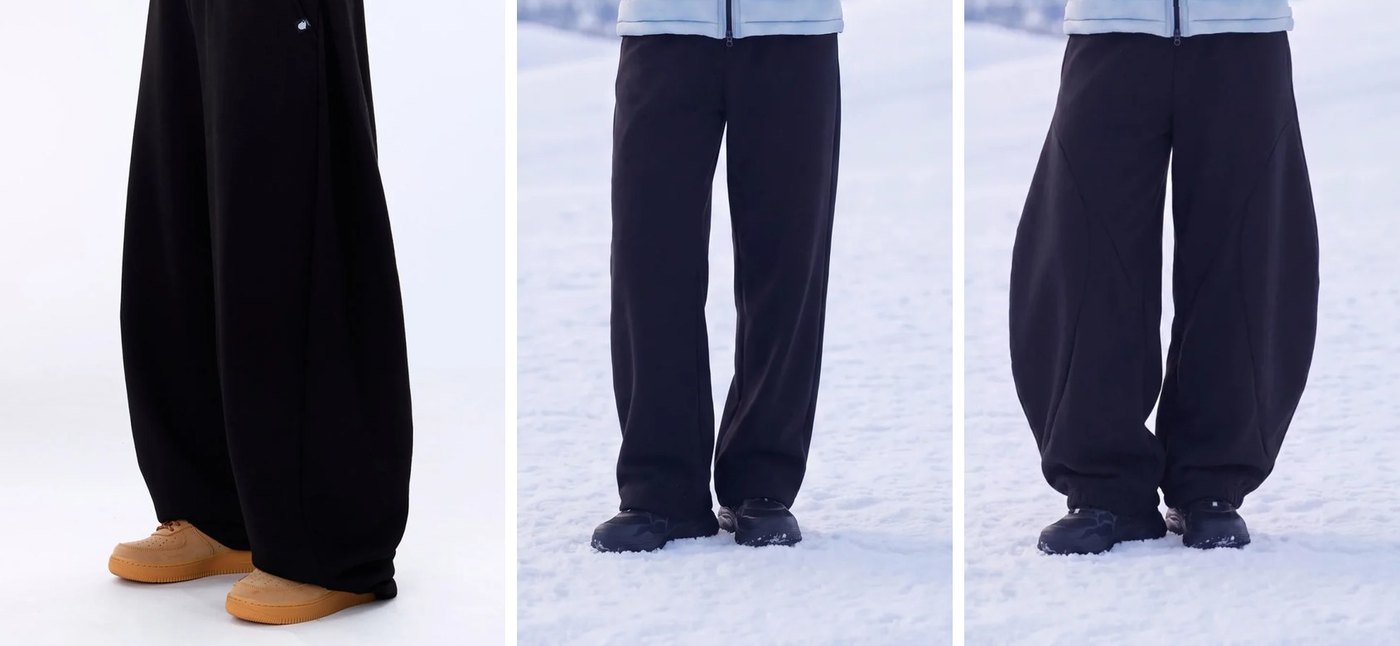
The color is right. The fabric looks right. The length reaches the ankle, just as it should. Only the silhouette is wrong.
And it isn't wrong in a random direction. It drifted toward the most common kind of pants. The same thing happened again and again with cocoon silhouettes, ultra-wide legs and below-the-knee crops. Every time, an extreme shape converged into a moderate one.
Sellers spot this difference at a glance. And shape can't be offset by anything else: no matter how good the color and fabric are, if the silhouette is different, that shot doesn't get used.
02 · Never Seen
So why is it only the shape that goes off? The answer lies in what the model grew up looking at.
Large models learned the internet's average clothing. Most pants have straight side seams, a moderate leg width, and a silhouette that follows the body. Balloon, cocoon and ultra-wide are almost absent from that pool. These are shapes you only find at a handful of designer brands.
It isn't that the model can't draw them. It simply doesn't know them. It's like asking someone to pronounce a word that isn't in their dictionary. And that one fact explains everything else.
Because they sit inside the average. Black sweatshirt fabric and elastic waistbands are everywhere on the internet. The model already knows them, so when you call for them, they show up.
The more extreme the shape, the fewer the examples. So the result gets pulled toward the closest thing the model does know. Ask for balloon and you get straight-leg; ask for ultra-wide and you get "reasonably wide." The middle photo above is exactly that kind of result.
03 · The Words Were There
When the result is off, the first suspect is usually the description. So we opened up that garment's description. Its first sentence read like this.
A balloon (jar-shaped) fit that falls fully in a curved line from thigh to hem, creating a sculptural, striking avant-garde look.
Balloon, jar, curve, full (벌룬, 항아리, 곡선, 풍성): every word it needs is already there. This sentence was a draft written automatically by image analysis, and when the seller reviewed it, they didn't change a single character. In other words, it was a description a human agreed was correct.
The straight-leg pants above are what came out when we put that exact description in.
Words can only call up what is already there; they can't create what isn't. If the model has almost no visual prototype for balloon to point to, the word gets buried as one of twenty-odd description tokens. And a familiar shape fills the gap.
We should add that when a shot like this comes out, the way to rescue it already exists inside StyleRoom. With StyleRoom's Fine-tune feature, you select just the pants area and put the same sentence in again, and the curve comes back (the right-hand photo above). In a small area, the word doesn't get buried.
That path, though, only starts once the seller notices the mismatch, selects the area and re-enters the instruction. Every single output picks up that round trip.
04 · Show, Don't Tell
If words don't work, the only way left is to teach by example. You pair photos of this brand's clothing with on-model shots of those same garments, show the model a number of them, and let it pick up the rule between them on its own.
There's one more reason this has to be training. Each brand needs a different answer. "Loose fit" means a different garment at every brand. At one it's dropped shoulders and wide sleeves; at another it's a roomy body with the shoulder line right where it normally sits. No matter how finely you split the vocabulary (oversized, semi-oversized, relaxed, balloon, cocoon), every new brand brings one more version of "loose fit."
What we need isn't a better description. It's something that exists separately for each brand.
05 · But We Can't Build Models
Training being the answer doesn't mean any training will do. There's something we need to admit up front: we can't build an image generation model ourselves.
Here's who is in this game right now.
| Built by | Model | Weights |
|---|---|---|
| OpenAI | GPT Image · DALL·E | Closed |
| Imagen · Gemini image | Closed | |
| Midjourney | Midjourney | Closed |
| Adobe | Firefly | Closed |
| ByteDance | Seedream | Closed |
| Black Forest Labs | FLUX | Partly open |
| Stability AI | Stable Diffusion | Open |
| Alibaba | Qwen-Image | Open |
These were built on internet-scale image data, running GPUs by the thousands for weeks at a time. We don't have that much data, that many GPUs, or the capital to support it. We can't catch up either: while we run for a year, they keep running too.
The bottom three in the table, however, have open weights. That means that even if we can't build them, we can take them and use them, and that's where a path opens up.
So the question becomes this: how do we take an open model and put something of our own on top of it? There are three ways, and the first two don't work.
That's the approach we just saw. It already fails on this very request: the request where we wrote "balloon" is the one that produced straight-leg pants. Words can't call up a shape the model doesn't know.
On top of that, nothing accumulates. Explain it a hundred times, and on the hundred-and-first you have to start over from scratch. You end up redoing, every time, something that fails every time.
We've got an open model, so why not just retrain the whole thing? That doesn't work either.
First come the practical walls. Retraining an entire model takes a matching amount of GPU power, every brand ends up with its own copy of a model weighing tens of GB, and while it learns new things, it forgets what it used to know. It learns balloon fit and then can't draw a shirt anymore.
The bigger problem, though, is how it gets taught.
Open up the entire model and teach it with a brand dataset of a few dozen garments, and the model won't bother looking for a rule. Memorizing those few dozen images outright is far easier.
It's like an exam covering 100 questions: if you can memorize every answer, nobody studies the underlying principles. It reproduces the garments in the training set perfectly, but with a garment it has never seen, it can't do anything. What we wanted was the rule "this brand uses this kind of curve." What we got was "that photo of those pants."
Here we flip the question. The images large models produce are, honestly, mostly good. The color, fabric, lighting, background and pose are all at a level we could never build ourselves. Only one thing goes off: the silhouette.
In that case, there's no reason to rebuild the model. All we need is this one thing.
Could we keep everything it draws well, and swap in just this brand's fit?
Without touching the model as a whole, you write down only "this brand uses this kind of curve" on the side, and add just that when the image is drawn. That's LoRA (Low-Rank Adaptation), and it's the only one of the three that works. In the next section we'll look at how that's possible.
06 · What It Is
So how do you actually do "same image, just the fit"? Let's start with an analogy.
Think of the model as a very thick manual on how to draw. Draw clothes like this, wrinkles like this, light like this: billions of lines of instructions like that. Rewriting all of it is the "retrain the whole thing" from the previous section, and that doesn't work.
So we don't change a single letter of the manual. Instead, we attach one thin correction note next to it. It's a sheet with only the differences on it, like "this brand's pants balloon out this much more, right here."
When drawing, the model reads the manual and the note together. It draws exactly by the manual, except for what the note says to do differently.
That's LoRA. The manual is W, the note is two sheets, A and B, and training writes only on the note.
s and combined. At s = 0 the note is ignored, so the output is identical to the original.The note has three important properties.
Before training, the note has nothing written on it. So at first, the result is exactly the same as the original. As training goes on, it fills in line by line, and how much has been written is how much has been learned. We use this value later to check whether training is going well.
When drawing, a single number sets how strongly the note is applied. This is called s (LoRA scale).
At s = 0 the note isn't read at all, so you get the original as is. At s = 1 it's applied exactly as written, and at s = 1.3 it's applied 1.3 times more strongly than written.
This is where the problem from the previous section turns around. If the note were as thick as the manual, it could copy down the training photos wholesale. And we'd be back to memorization.
If the note is thin, there's no room for that. It can't write down every one of the few dozen garments, so it ends up recording only what those garments have in common. That's exactly the "this brand's curve" we wanted.
Small isn't just cheap. Small is what makes it learn.
for one brand
along one training run
to train one brand
07 · Ownership
There are two ways to make the note. And this choice changes the nature of the business.
Think of the tuning feature in Google's Vertex AI. You upload your data, and they adjust their model to fit you. It's convenient, and the results are good.
But the tuned result stays on their servers. We can call that model and use it, but we can't take it with us.
We take a model with open weights, like the bottom three in the earlier table, and make the note on our own GPUs. It takes more work.
In return, the finished note file stays in our own storage. We choose it, we build it up, and we use it.
| A · Tuning service | B · Open model + LoRA | |
|---|---|---|
| Training | Works | Works |
| Resulting weights | 🔴 Stay with them | Stay in our storage |
| Our data | 🔴 Makes their model better | Builds up as our asset |
| Outcome | 🔴 We train the other side on our weapon | The gap builds up on our side |
What "our weapon" means matters here. Large models learn from what has already piled up in the world. The clothes have to sell, the photos have to pile up, those photos have to become training data, and a training run has to happen before the model knows.
to learn a new trend
sellers bring us their clothes
that only we have
Sellers bring their clothes to us before they sell. They shoot the samples, revise the descriptions and pick which shots to use. Every one of those actions is a judgment: "this is how this garment has to look to sell."
What large models will learn half a year from now, we receive today, straight from sellers' hands. What we have isn't a bigger model. It's earlier data. If we used that data to improve someone else's model, the advantage would disappear.
08 · Fit
What we want to build up comes in two very different kinds. LoRA is a form that fits both.
A brand's fit and silhouette rarely change. So per-brand adapters accumulate. The more garments come in, the better that brand's adapter gets, and the better it gets, the harder it is to move elsewhere. One file is one brand, so even at 100 brands there is still just one model.
What's hot now won't be hot in six months. So you have to train again and swap it out. With LoRA, training takes a few hours and the files are small, so swapping is realistic. If the setup required retraining the whole model, this axis would be flat-out impossible.
And this axis can't be caught up on later. What sellers brought in over the past six months won't appear just because you start collecting now. It's data made by time, and money can't bring it forward.
09 · Operationally
Strategy aside, the note approach makes two things possible in day-to-day work. Without either of them, the experiments themselves wouldn't be possible.
Draw without the note (s = 0) and you get the untrained original. Draw with it and you get the trained result.
That means you can generate "before training" and "after training" side by side, with the same garment, same background and same pose. Only one condition differs, so if there's a difference, it comes from the training.
Without this, even when the result looks good, you can't tell whether the training worked or that garment was just easy.
Because the note file is small, during training we save a copy of its intermediate state twenty times. A note that has learned a little, one that has learned about half, one that has learned all the way: twenty sheets in total.
When training is done, we try all twenty and pick the best one. There's no guarantee that the one trained to the very end is the best, and in practice there were cases where a middle one was better.
If we were retraining the whole model, we'd have to store twenty copies weighing tens of GB each, so this wouldn't be possible.
10 · The Handles
These are the values a person sets when kicking off training. Let's go through what each one means.
This sets how many pixels of each photo the model looks at while learning. Photos larger than this are scaled down. Looking at them small makes learning faster but smudges fine detail like the weave of the fabric; looking at them large is slower but picks up that detail too.
This is how many times the note gets revised. Think of it as the total amount of training. Too few and it learns less; more and it learns more, but past a certain point it actually gets worse (it starts memorizing).
This is how strongly the finished note is applied when drawing. Since it's set after training is done, you can try different values without retraining.
This is the thickness of the note. More lines let it record more, but too many let it copy down the training garments wholesale, so memorization gets easier. It has to be reasonably thin so that it only records what they have in common.
This is how big a change each revision of the note makes. Big changes learn fast but overshoot; small changes are stable but take a long time.
Here's how these five have behaved in our experiments so far.
| Value | In our experiments |
|---|---|
max_pixels | Changed the results the most |
step | There's a best range; go past it and results get worse |
s | Changing it didn't change the results |
r | Fixed at 32. We also ran 64 but didn't keep a comparison |
lr | We've never set it. It runs on the default |
11 · Step
Let's look at how training actually proceeds.
We show the model a few photos of clothing and have it try drawing them. We compare against the answer (the real on-model shot) and revise the note a little by however much it was off. One round of this is 1 step.
Show it every garment you have once, and that's 1 epoch. The same garments are shown over and over, much like a person working through the same problem book several times.
Show 155 garments 16 times each and you get 2,480 steps. Each step takes about 8 seconds, so 5 hours in total.
If the model learns from photos twice as large, each step takes longer. Once training is done, the time to generate one image also goes up from 90 seconds to 140 seconds.
When we first trained on small photos, the results were best at around 1,375 steps. So when we retrained with photos twice as large, we figured we'd just look around the same point.
But the results at that point were terrible. With larger photos there is more to take in at once, so at the same number of steps, the model had learned far less.
We kept it running, and it kept improving even past 2,000 steps. "Same number of steps, so it must have learned about the same" turned out to be wrong.
12 · How Far
So how do you know how much it has learned at any given point? Earlier we said the note starts out blank. That means how much is written on the note is how much has been learned.
Add up the size of all the numbers written on the note into a single value, and it grows as training goes on. The point where that value stops rising and levels off was usually the point where the results were best.
That said, this is "how much was written," not "how well it was written." It may have written a lot of the wrong thing. So we use this value only as a signal that says "time to look at the results around here," and decide good or bad by looking at the generated images with our own eyes.
Wrap-up
Balloon Fit Doesn't Come Out as Balloon Fit. It isn't because the description falls short: every word it needed was already written, and a human had even reviewed it. The large model has almost never seen clothes like that, so it got pulled toward the closest shape it knows.
What the model doesn't know, you have to show it. But we can neither build a large model nor catch up with one. So we take it as it is and put what only we know on top of it.
LoRA is not a way to beat large models, but a way to use them while keeping something of our own. We see, every day, the clothes large models don't know. Turn those clothes into notes, and they build up in our own storage.
This is the direction StyleRoom is heading. Large models will keep getting better, and that's good news for us. We just put our notes on top of better images.
Meanwhile, we keep adding one note for each brand. Every time a seller brings in a new garment, that note gets thicker, and the thicker it gets, the harder it is for anyone else to imitate. We borrow the model, but what builds up on top of it is ours.