The last three pieces were about photos: a silhouette the giant models don't know, fit names that keep getting invented, and what happened when we trained on a brand's lookbook. This time it isn't photos. It's text.
00 · Where It Started
Here's what happens when a seller uploads a garment to StyleRoom.
There's one place where it reliably gets stuck. Fit. The garment is a balloon fit and it comes out wide; it's cropped and it comes out reaching the ankle.
There are two ways to fix it.
Fix the text: edit the description written in step 02 and generate again.
Fix the photo: touch up just that part of a photo that's already out.
Fixing the text doesn't take instructions well. Even if you spell it out in numbers, like "the hem sits 3 cm above the ankle," the model won't draw it that way. So you tweak the text a little and regenerate, then tweak and regenerate again.
Fixing the photo is something we're building separately. This piece is about the description side.
Before you can fix the description, there's something you need to know first: how right that text is right now. And it turned out there were people already grading it every day.
When a seller uploads a garment, the model writes a product description. Then the seller reads that draft and edits it. The edit is saved as is. What the draft said and what a person changed it to stay together as a pair.
It's a record of people pointing out, every single time, what the model got wrong. So we opened it up.
Two things came out of it.
One. Everything that ends up in the photo comes from that description. The fit, the shoes, what it's worn with: all of it is decided there. Write in a brand and a model name, and that's exactly what shows up. So getting that text written well is the same job as making the photo well.
Two. What the model gets wrong changes when its version changes. So training has to aim not at fixing this particular model's mistakes but at getting whatever model we use to write in our language.
Here's how we arrived at those two.
01 · The Request
StyleRoom has a separate field where sellers write requests. We opened it up so people could put in how they'd like the result to turn out. When we built it, what we had in mind was fit. That's where things got stuck, after all.
We sorted through 24,226 entries to see what actually goes in there.
| What's requested | Share |
|---|---|
| Shoes | 44.1% |
| Color | 44.1% |
| Length · fit | 26.0% |
| Accessories | 25.9% |
| Innerwear · layering | 12.6% |
| How it's worn | 11.0% |
| Hair · makeup | 8.2% |
One entry often asks for several things at once, so the total goes over 100%.
The single most frequent word was "shoes" (신발은), at 4,268 times. And fit, at 26%, came fourth.
We opened the field because of fit, but what people most wanted to control was shoes. If we only hold on to fit, we miss two-thirds of what people actually want to change.
There's a reason shoes come first. Shoes aren't something the seller uploads. Only a single garment photo comes in, yet the result shows the model all the way down to the toes. We fill that spot in ourselves, so from the seller's side, writing it here is the only way to have a say.
So they write things like this.
What comes in through the request field
"Put her in white Converse and make the fit roomy so the whole look feels slouchy and relaxed. Give the model a top bun." "Gray ankle socks with Balenciaga Track sandals." "For shoes, put on Vibram FiveFingers Performa Jane Evo in triple black."
They pin it down four levels deep: brand, line, model name and color. They aren't loosely describing a style. They're specifying a product.
02 · It Works
While skimming the request field, one sentence caught our eye. It was attached, word for word, to 190 garments.
Not a single character changed, across 190 garments
"The shoes are the Converse Chuck 70 Classic, in black."
Brand, line, model name and color. It reads like something copied off a product page. So we got curious: if you write it like this, do you really get that shoe? We pulled the result photos and went through them one by one.
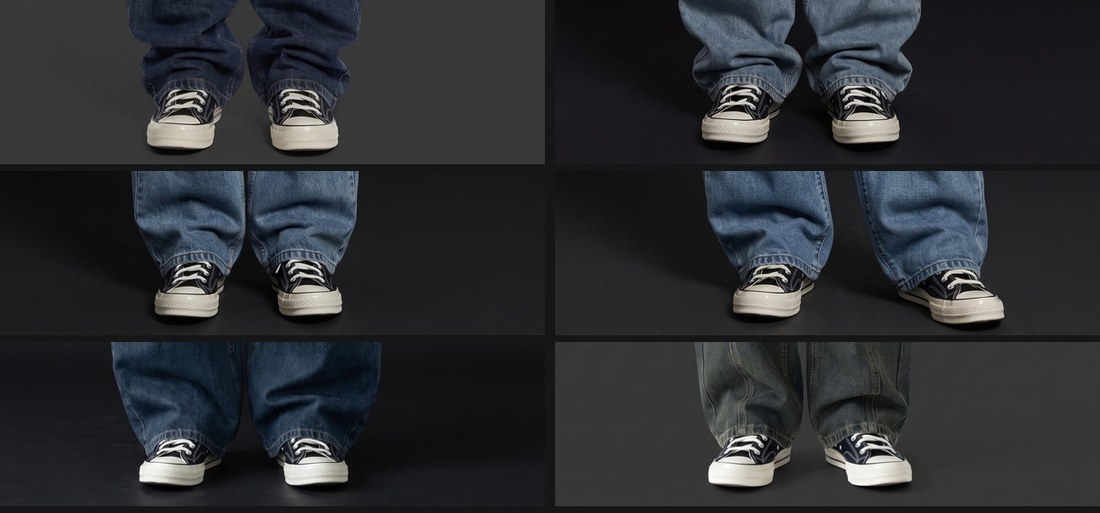
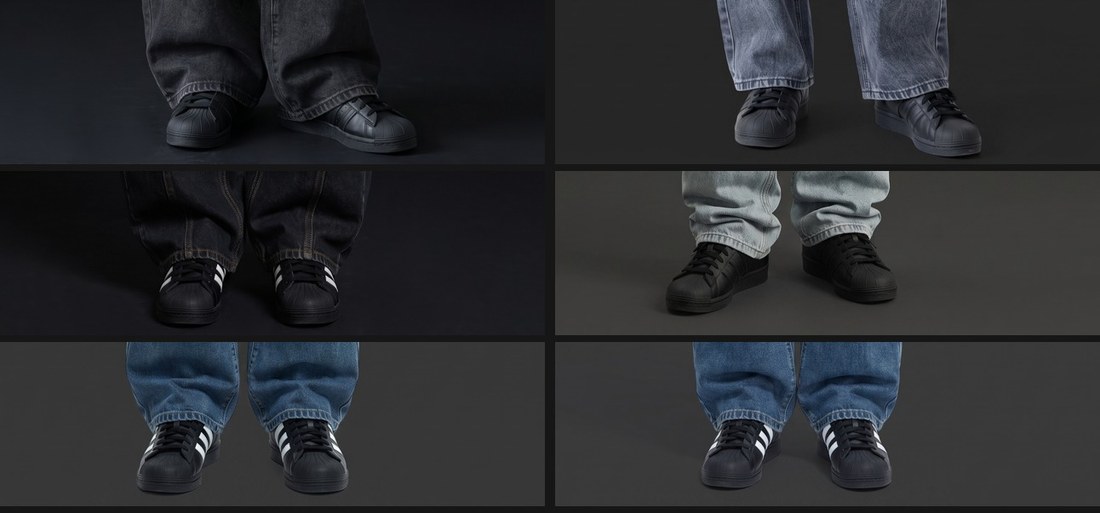
There was something even more convincing. Two of the requests came with garment photos where different shoes were already being worn.
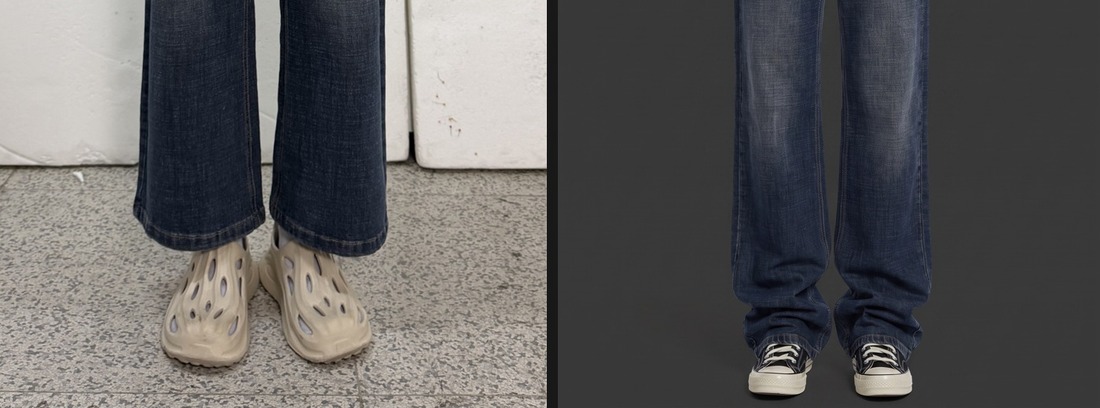

To rule out the model simply reading the shoes off the photo, we went through 30 automatically written descriptions. Converse, Chuck 70, Superstar: 0 hits, and in 14 of 16, the garment photo didn't show any shoes at all. Those words were put there by a person.
So brand reproduction isn't what's failing here. It works. What's missing is this: once a sentence works well, we don't keep it anywhere. Sellers keep it somewhere on their end and paste it in every time. That's why the text is identical across 190 garments.
And those two sentences didn't belong to one person. They're spread across several accounts, with creation times right next to each other. In other words, one team is using them together.
What's needed here isn't a better model. It's a save button. Pin the sentence that worked and drop it straight onto the next garment. And it should belong not to one person but to the whole team, shared.
03 · Absolutely
Going back through what came into the request field, certain words jump out.
Where "absolutely" shows up
"Don't tuck the T-shirt into the pants, absolutely not" "Absolutely no long output for the pants length or the tie length" "Must apply exaggerated, ultra-oversized proportions at fashion editorial level; do not generate it like ordinary wide pants" "Must fasten all 3 buttons"
"Absolutely" is what you write when it hasn't worked even once. Nobody writes "absolutely" about something that worked from the start. Wherever this word appears is a spot that has failed many times over.
04 · The Default
So far we've been looking at what sellers write in the request field. From here on it's the other side: the record of sellers editing drafts the AI wrote.
Pull out the corrections to the fit item, and the sentence before the edit is always the same.
| AI draft | What the seller changed it to |
|---|---|
| Regular fit | Semi-over fit |
| Regular fit | Loose fit |
| Regular fit | Loose fit with a roomy body and relaxed length |
We didn't pick out a few; we counted every one.
⚠️ Most of these numbers come not from the model we use now but from the one before it. We explain why we flag this in the next section.
So what do sellers change it to?
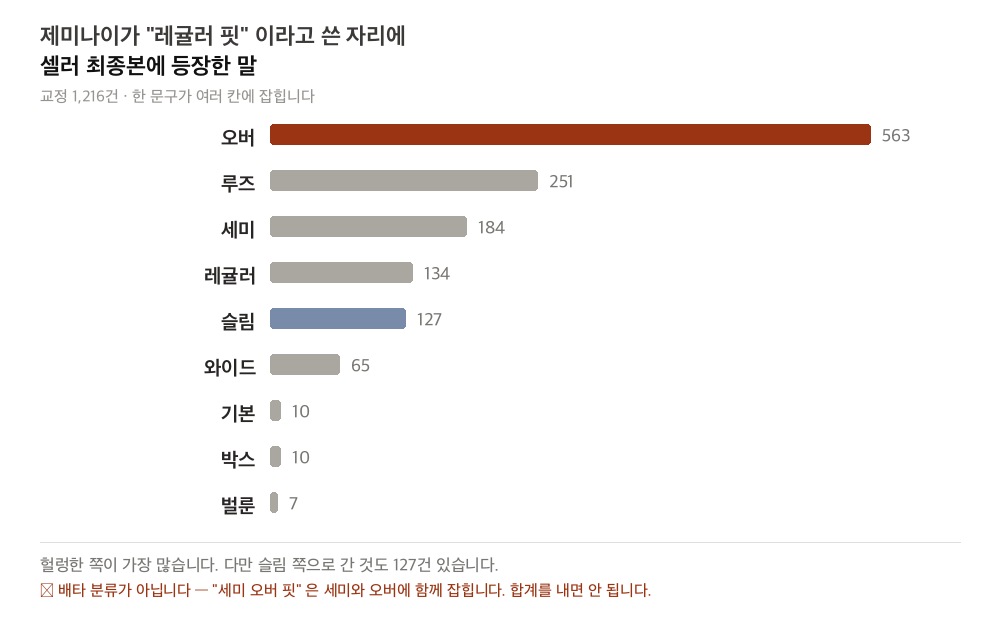
Over leads with 563, followed by loose at 251. But 127 went toward slim. It's not that the model always errs on the roomy side. It picks the middle, while real garments are scattered on both sides of it. The roomy side just happens to be bigger.
While we were looking into this, though, something happened.
05 · It Moved
The habit we first found was a little different. The AI was hedging its bets. It would write both, like "regular or loose" or "regular/oversized," and the seller would delete one of them.
We set up an experiment to measure that habit and ran a few images through it. It didn't show up. The prompt hadn't changed, but the results had. In the meantime, the model writing the drafts had been swapped for a new version.
Before the model swap → after
Documents with "or" (또는) in the draft 60.1% → 2.4% Documents with "regular" in the draft 29.8% → 4.5%
The hedging all but vanished. Regular fit dropped but stuck around, and among what's left, it's still #1. That's why most of the numbers in the previous section come from the older model: by the time we'd finished counting, about half of what we were counting had changed.
Dig into what a specific version of a specific model gets wrong, and everything you've built disappears the moment that model changes.
So if we're going to train, the goal has to be this: not "fixing this mistake in this version," but getting whatever model we use to write in our language.
Models keep changing. When a better one comes out, we switch. If we had to research and retrain every time that happens, it wouldn't be an asset.
When the model isn't sure, it writes "regular fit." It's a middle value, neither wrong nor right. And real garments are usually roomier than that.
In the previous piece we wrote that sellers coin terms like semi-over fit (세미오버핏) · half-balloon fit (하프벌룬핏), while the model had never once used words like those. It's the same story. It doesn't know the ends of the range, so it stays in the middle.
06 · What The Photo Shows
We opened all 22,608 corrections one by one and judged whether each correction is something you could tell by looking at the photo. People made each call with the photo and the correction side by side.
But that ratio differs a lot from item to item.
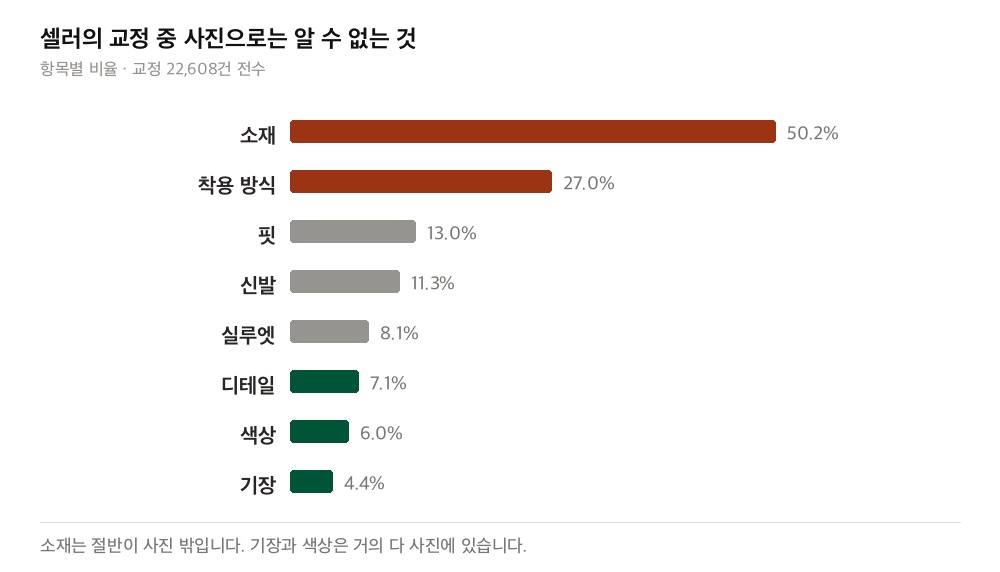
Material is where it splits. Length and color are almost entirely in the photo. Half of material is outside it. You need the label to know the fiber, and a tape measure to know the measurements.
Corrections you can't make from the photo
AI Ribbed knit fabric Seller Polyester and cotton blend fabric AI Appears to be a cotton blend, and Seller Made with linen fabric, and AI Cropped length, above the waistline… Seller Chest width 47cm, total length 51cm
This isn't the model getting it wrong because it couldn't see. The information isn't in the photo. However good the model, give it only the photo and it can't get this right. The seller knows because they're holding the real thing.
You can tell how absent that information is from the values that come back. Where the draft said "presumed to be a cotton blend," nineteen people changed it to nineteen different things.
Values that went into the same spot
Presumed to be rayon, and Presumed to be a cotton-linen blend, and Poly 100% fabric Matte, washed 100% cotton fabric COTTON 43% / POLY 52% / SPAN 5%
"Outside the photo" doesn't mean left blank because nobody knows. People do fill it in. It's just that the right answer is different every time.
When the model isn't sure, it leaves that uncertainty in the sentence. The "appears to be a cotton blend" in the example above is one. Collect every spot with "appears to be…" or "presumed to be…" attached, and you get the items the photo can't settle. The model had been marking them itself, in effect.
But that marker doesn't only show up on material.
Corrected counts: 66 cases
AI six buttons → Seller 4 buttons AI two zip pockets → Seller one zip pocket AI 2 or 3 small buttons → Seller 3 small buttons
The last one is a sentence that gave up counting halfway. It's the same move as "regular fit," but buttons are something you can count. They're all in the photo, and if you point at them one by one, you have the answer. It didn't miss because the information was outside the photo.
07 · Both Ways
So we split them apart. We gathered spots where several people reverted a single draft expression to different values. That came to 713 types: fit 199 · length 143 · material 141 · detail 115 · color 92. It isn't only fit that splits.
From those, we pulled only the pairs where A had been corrected to B and B had also been corrected to A. This was the biggest one.
Original text in both directions
Black → Navy Black base → Navy base Deep, dark navy blue → Black Dark Navy → Black
What matters is that it's 53 to 44. If it leaned one way, that would be a habit. It would mean the model keeps calling navy black, so you just tell it not to. But when the two sides are about even, it's not a habit; it can't tell the two apart. It's a coin toss.
White and ivory fall apart in the same place. And this isn't only about color.
Stripe direction: five cases, split both ways
AI Long sleeves featuring a vertical stripe pattern Seller Short sleeves featuring a horizontal stripe pattern AI Horizontal stripe pattern Seller Vertical stripe pattern
With color or material, you can shrug and say "that's hard to tell from a photo." Stripe direction is visible to anyone. And yet it goes wrong in both directions. With five cases, this isn't something to put a percentage on; it's only to say that it happens.
Even within fit, the two kinds were mixed together.
| Pair | One way : the other | Type |
|---|---|---|
| Regular fit ↔ loose fit | 18 : 3 | Habit |
| Loose fit ↔ over fit | 7 : 1 | Habit |
| Regular fit ↔ oversized fit | 4 : 3 | Can't tell apart |
| Regular fit ↔ wide fit | 4 : 3 | Can't tell apart |
What we described earlier as "when it doesn't know, it writes regular" is the 18 to 3 pair. That one really is a habit. But the same "regular," when it runs into oversized or wide, comes out 4 to 3. Within a single item, what can be fixed and what can't sit side by side.
The distinction matters because the fix is different. A habit shrinks when you change the wording. Not being able to tell two things apart doesn't respond to wording. For that, the only way is for the person holding the real thing to tell us.
This calculation is anchored on the draft source snippets pulled out by our tagger, and the base is the 12,741 cases where the snippet survives on both sides. We matched pairs on the characters alone, without a word dictionary, so the real number of pairs is higher than this. People were counted as people, with accounts folded together, not as accounts.
08 · The Trap
Having come this far, the next move looks obvious. Wrong sentences and corrected sentences are piled up in pairs, so if we put them into training, won't the model learn how to correct?
But first, look at how much actually gets corrected.
| How much of a document was edited | Documents | |
|---|---|---|
| Untouched | 207 | 1.35% |
| Under 5% | 7,185 | 46.98% |
| 5-20% | 5,714 | 37.36% |
| 20-50% | 1,697 | 11.10% |
| 50% or more | 490 | 3.20% |
Sellers touch only around 5% of a document. The other 95% goes out exactly as the model wrote it. So training does the math like this: leave the draft as is, and you're 95% right. Not correcting scores higher than trying to correct and getting it wrong.
We thought we had collected a correction log, but most of what's in it is an approval log. Overwhelmingly, it's sentences a seller read and judged "fine to go out as is." As long as those approvals are the majority, whether you add more data or train for longer, copying keeps paying off for the model.
So we changed direction. We don't train on every sentence equally. We put weight on the spots sellers actually touched, so that getting those wrong counts as a much bigger mistake. The 95% of approved sentences pass through lightly, and the 5% is what drives the training.
09 · What It's Really For
This may read like a story about text training, but that's only one of several threads. What we're trying to do goes back to where we started: making the two images you get when you upload a garment better.
As we saw earlier, everything that ends up in the photo comes from that text. The fit, the shoes, what it's worn with: it all comes from there. And the words you use for the same thing change the result. Write it in centimeters and the model won't draw it that way; write it as the point on the body it reaches, and it will.
Take the new expressions sellers wrote in while fixing length and line them up down the body, from top to bottom, and you get this.
| Point the seller marked | Count |
|---|---|
| To the hips · slightly covering the hips · below the hips | 72 |
| Mid-thigh · to the thigh | 79 |
| Above the knee · to the knee · covering the knee | 49 |
| Below the knee | 52 |
| Mid-calf · to the calf | 43 |
| Above the ankle · to the ankle · covering the ankle | 67 |
| Covering the top of the foot | 62 |
| Slightly covering the shoes · above the shoes | 16 |
Centimeters don't show up. Instead, sellers mark a point on the body and put a degree on top of it: slightly 397 · more 395 · very 215 · really 203. The point and the intensity stick together as one unit, as in "slightly covering the hips."
That "more" (더) shows up this often is worth noticing, too. Longer than now: it's not a fixed value but something said relative to the photo that just came out. People don't think in absolute lengths; they think in how far to move it from what's on the screen.
So for length, a list of eight or nine points covers everything. From the hips down to above the shoes, they line up in order along the body. But width and silhouette don't form a list. In the same data, expressions ending in "fit" came to 196 types, and even putting in the 30 most-used ones only covers 69.2%. The rest are words that aren't on any list. That's the story from the previous piece.
So this is what we're holding on to now: getting the expressions people hand-type every time to come out right from the start. Text training is one way to get there, and splitting things into slots or reworking the prompt serves the same goal.
10 · What We Take
| Question | Answer |
|---|---|
| What do people write in the request field? | Shoes 44% · color 44% · fit 26%. Fit comes fourth |
| If you spell it out, does it come out that way? | It does. All twelve brand-shoe images matched |
| Then what's holding things back? | We don't keep the sentence that worked |
| What does the model write when it isn't sure? | Regular fit. Sellers delete it |
| Will that habit last? | No. It disappears when the model changes |
| Are there items the photo alone can't settle? | Yes. Material is one |
| Are all the errors the same kind? | No. Habits and can't-tell-aparts are mixed together |
| Can the correction log go straight into training? | No. The model learns not to correct |
| Is everything sellers change an error fix? | No. Sometimes they want it that way even if it differs from the photo |
What makes this record useful is that people pointed out, with their own hands, where the model wavers. It shows which items the photo resolves and which it doesn't.
That said, having a lot of data didn't automatically mean it would train well. What we needed out of the pile was the parts people had touched. The rest was dead weight holding the model in place.
And what sellers fix isn't always a matter of "correcting something wrong."
Changed to differ from the photo
AI silver cross pendant → Seller silver heart pendant AI moderately deep V-neck → Seller classic round neck AI short cropped length → Seller standard length
These are all visible in the photo. They aren't like material or measurements, which you need the real item to know. These make up 1.94%.
At first we took these as sellers correcting things wrongly. But that's not it. They want the cross to be a heart. The goal isn't to transcribe the photo accurately; it's to get the photo they want. There's no right or wrong here.
And that shows the nature of this data in a new light. It isn't the right answer for the photo but the seller's intent. And intent isn't anywhere in the photo. Looking at the real item won't reveal it either. It lives in the seller's head, and all that reaches us is the already-edited result.
This runs through the whole piece. Nineteen people wrote material nineteen different ways, and black and navy split both ways. That's because there isn't just one right answer. Even with the same photo in front of them, different people want different things.
So the job is clear. Pull what can be pulled from the photo as accurately as possible, and for what the photo can't provide, make it so the seller says it once and it's applied automatically from then on. That's what the save button in section 02 was about.
This piece was about what happens before the photo comes out: getting the model to write that product description, the one that reads the garment, well. Touching up photos that are already out is something we're building separately. Either way, we're after one thing: helping the seller land the one image they like.
And StyleRoom will keep running experiments like these. Train one more brand, run it again with seller corrections, and if the results don't come, change the conditions and run it again.
Along the way, we found we needed something. To run one training, you have to choose which data to use, bundle it into a set, caption each image, set the parameters, and pick which step to pull the checkpoint from. Once a set is bundled, you keep using it. The same set goes into training this time and into validation next time, and you run it again with only the conditions swapped. Change one thing and the result changes, but you only see what caused it when you put it side by side with earlier runs. Do all this by hand every time, and experiments scatter instead of adding up.
So we built a separate tool for stacking up sets, running them with only the conditions swapped, and viewing the results side by side. We call it LoRA Lab. That's what the next piece is about.